If your product photos still look like they came straight off the camera, you’re leaving money on the table. Professional image post-production services are what turn a flat, uneven product shot into the clean, consistent image that actually gets clicked on and bought. For online sellers, this isn’t a cosmetic extra — it’s part of the product page that customers judge in the first two seconds.
This guide breaks down what these services actually include, when you need them, and how to pick a provider without guessing.
What Counts as Image Post-Production?
Image post-production is everything that happens to a photo after it’s taken. It’s the difference between a raw file straight from the camera and the finished image your customer sees on the product page. The main services under this umbrella are:
- Clipping path service — isolating a product from its background
- Ghost mannequin service — removing the mannequin from apparel shots for a floating, 3D look
- Shadow creation — adding realistic or drop shadows for depth
- Photo retouching — color correction, blemish removal, detail enhancement
Each one solves a different problem, but they’re often used together on a single image.
Why This Matters More Than Sellers Think
Marketplaces and storefronts live and die by their images. On Amazon, for example, the platform enforces strict rules for main product images — pure white backgrounds, minimum resolution, no watermarks or props — and non-compliant images get suppressed from search entirely, according to Amazon’s own product image requirements. On Shopify, there’s no enforced rule, but the same principle applies: product photography influences whether shoppers click “Add to Cart” or bounce to a competitor .
In short: inconsistent or unprofessional images don’t just look bad — they actively cost you visibility and sales.
Clipping Path: The Foundation Service
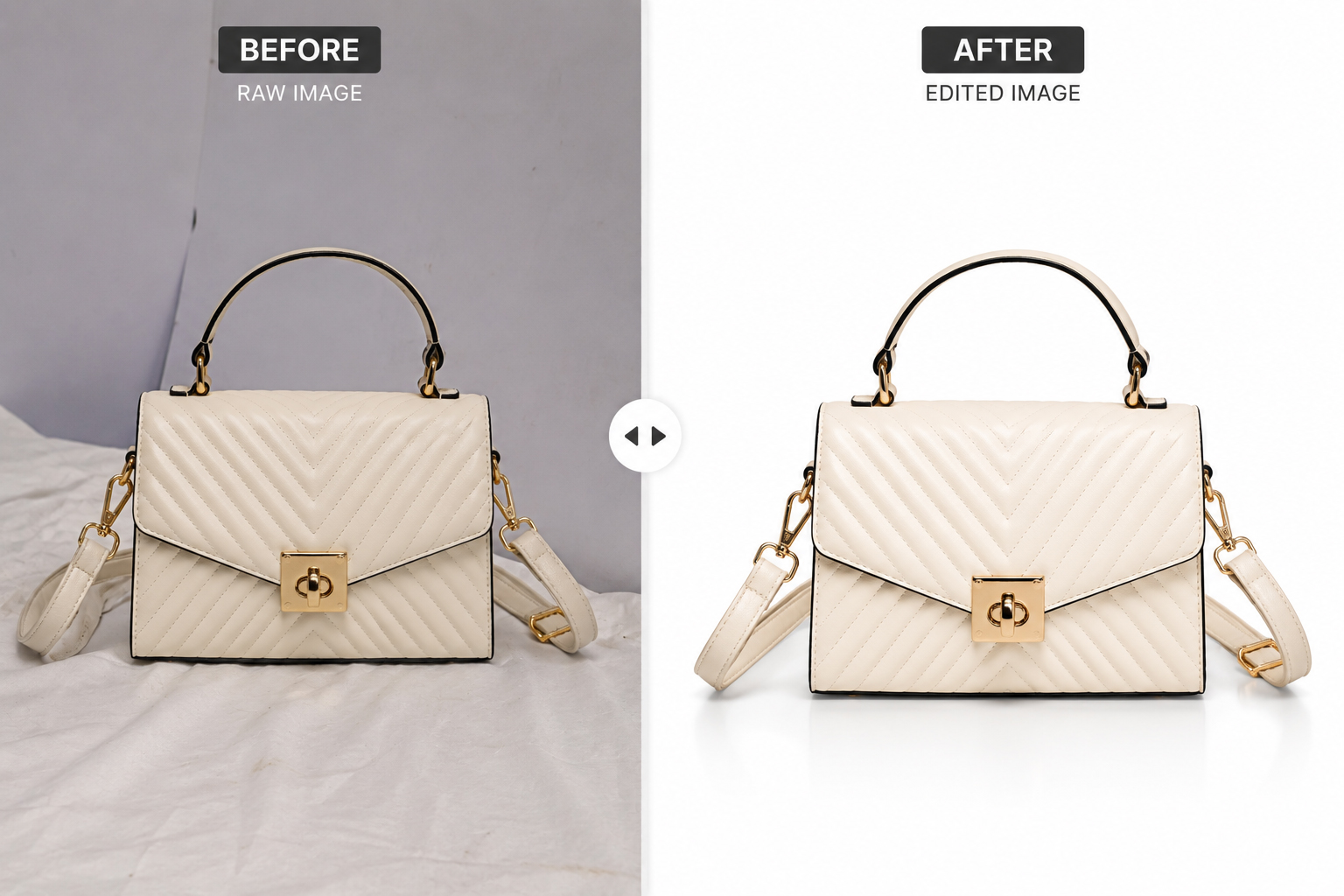
A clipping path outlines the exact edge of your product so it can be cleanly separated from its background. It’s the most requested of all professional image post-production services because almost every other edit — background swaps, shadow work, resizing for different platforms — depends on having a clean path first.
Traditionally this is done with Photoshop’s Pen tool, which lets an editor draw precise anchor points to create a vector path around the subject. Done well, it holds up even on tricky edges — fine fabric, jewelry chains, curved product lines — where automated background removers usually fail.
Best for: apparel, jewelry, electronics, furniture — anything sold against a clean or white background.
Ghost Mannequin: Making Apparel Float
If you’ve seen a shirt or dress on an e-commerce site that looks like it’s floating with no model or mannequin in sight, that’s ghost mannequin editing. The product is photographed on a mannequin, then the mannequin is digitally removed and the resulting gap (collar, sleeves, waistband) is filled in using multiple reference shots.
This gives clothing a natural, 3D shape without hiring a model for every listing — and it keeps every product photo on your store looking consistent, which matters more than most sellers realize when customers are comparing dozens of similar items.
Shadow Creation: Adding Depth Without Overdoing It
A completely shadow-free product on pure white can look flat or “cut out.” Shadow creation fixes that. There are a few common types:
- Natural shadow — mimics how the product would actually sit under light
- Drop shadow — a soft, offset shadow to make the product feel lifted off the page
- Reflection shadow — a mirrored effect, typically used for glossy or reflective items
The goal isn’t a dramatic effect — it’s making the image feel physically real instead of pasted onto a background.
Photo Retouching: The Final Polish
Retouching is the cleanup pass: correcting color casts, removing dust or lint, smoothing out fabric wrinkles, brightening dull tones, and matching color consistency across an entire product line. It’s usually the last step after clipping, ghost mannequin work, and shadow creation are done.
For catalogs with dozens or hundreds of SKUs, retouching is also where color consistency gets enforced — so a red shirt looks like the same red across every angle and every listing.
Common Mistakes Sellers Make
- Skipping consistency across a catalog. One product edited well and the next left untouched creates a disjointed storefront.
- Over-relying on automated background removers for complex products like jewelry, fur trim, or transparent fabric — they tend to leave rough or jagged edges.
- Ignoring platform-specific specs. A background that works on Shopify may get your listing suppressed on Amazon.
- Treating retouching as optional. Even great photography benefits from color correction and cleanup.
DIY vs. Professional Services
DIY tools have gotten better, and for a handful of simple product shots they can be enough. But there’s a real gap once you’re dealing with volume, complex materials, or platform compliance requirements.
| DIY | Professional Service | |
|---|---|---|
| Cost per image | Lower upfront | Priced per image or bulk rate |
| Time investment | High — your own hours | Outsourced, faster turnaround |
| Complex edges (jewelry, fabric) | Often rough | Handled with precision |
| Consistency across a catalog | Hard to maintain | Built in |
If you’re editing 5–10 images a month, DIY might be fine. Past that, especially with apparel or jewelry, the time cost of doing it yourself usually outweighs the savings.
Choosing the Right Provider
A few things worth checking before you commit:
- Ask for a sample edit or free trial on one of your own images before ordering in bulk.
- Check turnaround time — and whether it holds up during high-volume periods.
- Confirm file format and delivery specs match what your platform requires.
- Look for experience with your specific product type — jewelry retouching and apparel ghost mannequin work require different skill sets.
Ready to Upgrade Your Product Images?
If your product photos aren’t matching the quality of your competitors, that’s a fixable problem — not a photography problem. Get a free trial on one of your own images and see the difference professional image post-production services can make before you commit to a bulk order.